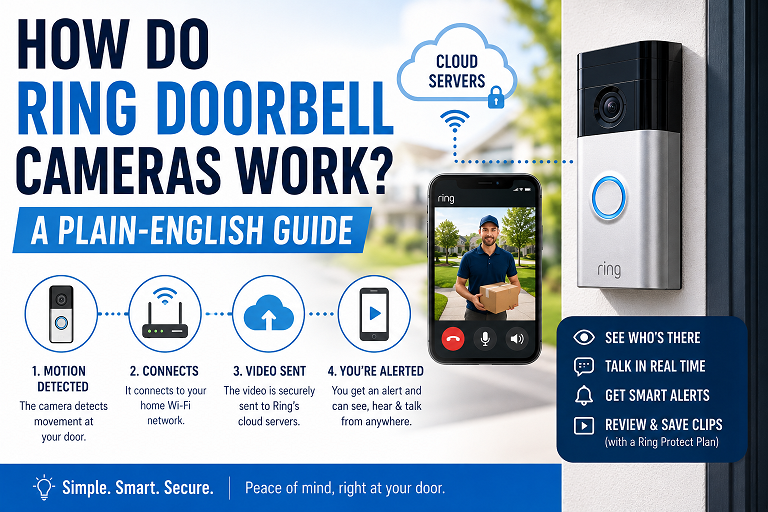
How Do Ring Doorbell Cameras Work? A Plain-English Guide
This post contains affiliate links. As an Amazon Associate, we may earn a commission from qualifying purchases at no extra cost to you.
A Ring doorbell connects to your home Wi-Fi and runs on either a rechargeable built-in battery or your existing doorbell wiring. When the button is pressed or its motion sensor detects movement, it sends a live video alert straight to your phone through the Ring app, letting you see, hear, and talk to whoever’s at your door from anywhere with an internet connection — no subscription required for that core function. A Ring Protect plan is only needed if you want to save and rewatch video later.
Ring doorbells are the best-known name in video doorbells, and for good reason — the setup is simple enough that most people are up and running in under 20 minutes. But “how does it actually work” is a fair question, especially once you start comparing battery vs. wired models or trying to figure out what the Ring Protect subscription really changes. Here’s the plain-English breakdown.
The Basics — What Happens When Someone Rings
At its core, a Ring doorbell is a small camera, microphone, speaker, and motion sensor built into a doorbell-sized unit. When someone presses the button, three things happen almost instantly: the doorbell chimes (either through a paired Ring Chime, a compatible Alexa device, or your existing wired chime on some models), it starts recording video, and it sends a live notification to your phone. Tapping that notification opens a live video and audio feed, so you can see the visitor and talk to them in real time — from your driveway, your office, or across the country, as long as you have an internet connection.

How Ring Doorbells Get Power
Ring doorbells come in two power types, and the right one depends on what’s already at your front door.
- Battery models (like the Ring Battery Doorbell) use a built-in rechargeable battery that charges over USB-C. You detach the doorbell faceplate from its wall mount, plug in the included cable, and reattach it once charged — no wiring or tools needed, which is why these are the go-to option for renters and anyone without existing doorbell wiring.
- Wired models (like the Ring Video Doorbell Wired or Ring Wired Doorbell Pro) connect directly to your home’s existing doorbell wiring for continuous power, so you never think about recharging. Installation requires that wiring to already be in place, and typically a Ring plug-in adapter or transformer to supply the right voltage.
Not Sure Which Type You Have?
If your current doorbell has two visible wires running into the wall behind it, you likely have existing doorbell wiring and can choose either a wired or battery model. If there’s no wiring at all — common in many rental units — a battery model is the simpler choice.
Motion Detection Explained
Ring doorbells use a passive infrared (PIR) sensor combined with the camera’s own video analysis to detect movement in front of your door. When it senses motion within its detection zone, it sends you an alert even if nobody presses the button — useful for catching a delivery, a passerby, or anyone lingering on your porch. Newer models add smarter alerts that can distinguish a person or package from routine motion like tree branches or passing cars, though the most advanced version of that filtering is a Ring Protect Plan feature.
The Ring App and Live View
Every Ring doorbell connects through the free Ring app, which is the hub for everything: live view, two-way talk, motion alert settings, and — if you’re subscribed — recorded video history. You can also connect a Ring doorbell to Alexa-enabled devices like an Echo Show or Echo Dot, letting you see who’s at the door on a smart display or hear a custom chime announcement without touching your phone.
What Ring Protect Actually Adds
This is the part that trips people up most: your Ring doorbell works — live view, two-way talk, and real-time alerts — with no subscription at all. What a Ring Protect plan adds is the ability to save and rewatch video after the fact, plus a few extras.
| Feature | Without Ring Protect | With Ring Protect |
|---|---|---|
| Live view & two-way talk | Included | Included |
| Real-time motion alerts | Included | Included |
| Recorded video history | Not saved | Saved and reviewable |
| Smart alerts (person/package detection) | Not available | Included |
| Video & photo sharing | Not available | Included |
| Cost | $0 | $3/mo per device or $10/mo per household |
Every new Ring doorbell includes a free 30-day trial of Ring Protect, so you can test the recorded-history features before deciding whether to keep paying for them.
Current Ring Doorbell Models
Setup — What to Expect
Download the Ring App and Create an Account
Available for iOS and Android. You’ll scan a QR code on the doorbell packaging to begin setup.
Connect to Your Home Wi-Fi
The app walks you through joining your 2.4GHz or 5GHz network — dual-band models can use either.
Mount the Doorbell
Battery models attach with included screws to nearly any surface; wired models connect to your existing doorbell wiring using the included tool kit.
Set Motion Zones and Notification Preferences
Adjust the detection zone in the app to avoid false alerts from a busy street or a neighbor’s driveway.
Frequently Asked Questions
How do Ring doorbell cameras work?
A Ring doorbell connects to your home Wi-Fi and runs on either a rechargeable built-in battery or your existing doorbell wiring. When someone presses the button or its motion sensor detects movement, it sends a live video alert to your phone through the Ring app, where you can see, hear, and talk to the visitor in real time from anywhere with an internet connection.
Does a Ring doorbell need Wi-Fi to work?
Yes. Ring doorbells require a home Wi-Fi connection to send live video, notifications, and recordings to your phone. Without Wi-Fi, the doorbell button and chime may still function on some wired models, but you won’t get remote alerts, live view, or video access through the app.
Do you need a subscription to use a Ring doorbell?
No, not for basic function — live view, two-way talk, and real-time motion alerts work without a subscription. However, without a Ring Protect plan, you cannot review recorded video after the fact; recordings are not saved for later viewing unless you’re on an active or trial subscription.
How does a battery-powered Ring doorbell get charged?
Battery Ring doorbells use a built-in rechargeable battery that charges via USB-C. To recharge, you detach the doorbell faceplate from its wall mount and connect the included cable — no tools or wiring required, which is why battery models are popular for renters.
What’s the difference between wired and battery Ring doorbells?
Wired Ring doorbells connect to your home’s existing doorbell wiring for continuous power and never need recharging, but installation requires that wiring to already exist. Battery models install anywhere in minutes with no wiring, but need periodic recharging — typically every few weeks to a couple of months depending on usage.